

Bot Manager
See every character at once and make them work together.
Bot Manager finds the characters that Phoenix Bot is running and lists them with level, map, position, HP, MP and state. You can also build groups. A group lets one character pull monsters while the others cast their skills in order.
Watch it, 69 seconds
What you can use it for
- Watching a whole fleet of characters from one window
- Killing groups of monsters together with several characters
- Casting a fixed series of skills from each character at the same moment
What it has
- A list of all detected characters: name, level, map, position, HP, MP, state, family and port
- A strip at the top of every page with one card per character, and a dot in the menu for pages that are running
- Groups with the roles DPS, Mobber and Mini Owner
- Skill series per character, a pet skill, and trigger skills for the Mobber
- A kill point with a radius: the group acts when everyone stands inside it
- Start all and Stop all for the whole group, and Refresh skills after you change a specialist card
- Groups and their skills are saved and come back when you start the manager again
How to use it
Let the characters appear
Start Phoenix Bot and your game clients. The Characters list fills by itself and updates every few seconds. Press Refresh to look again.
Create a group
Press New group, type a name and confirm. The group appears as a card under Groups.
Add members and roles
Choose a character in Add member. Give it a role: DPS, Mobber or Mini Owner. Type or browse the path of its INI file.
Choose the skills
Under Skill series press Add skill and pick skills from the character's own list. Use the arrows to cast a skill earlier or later. A Mobber also gets Trigger skills, a Kill point with X, Y and Radius, and Reset state every.
Try it with Dry run
Tick Dry run to see in the log what the group would do. Skills are written to the log and not cast.
Start the group
Press Start all. The badge on the card shows Idle, Gathering, Fighting or Buffing. Press Stop all to stop.
Good to know
- Phoenix Bot does the farming from each character's INI file. Bot Manager starts and stops it and adds the group steps.
- The Mini Owner is part of the group but is not started or stopped with it.
- Without a Mobber and trigger skills a group only follows the miniland visits of its members.
Screenshots
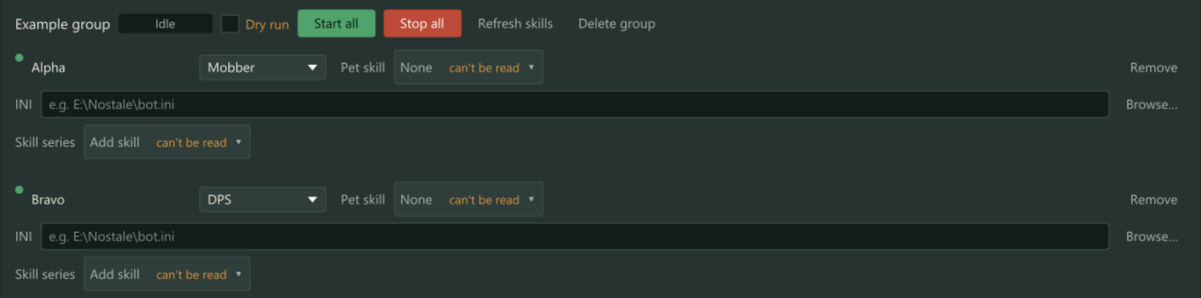
A group card with its members. Each member has a role, an INI path and a skill series. 
The Characters list. Every character Phoenix Bot runs shows up with its map, position, HP, MP and state. 
The Mobber settings: trigger skills, the kill point with its radius, and the reset interval.
Part of every licence
You do not need to buy anything extra for this. Download the starter and enter your licence key.